Automatic OG images: zero-effort social previews
How this theme generates beautiful Open Graph images at build time using Satori and Resvg Eand how to customise or disable the feature.
When you share a blog post link on Twitter, Discord, Slack, or LinkedIn, the platform fetches an Open Graph image to display as a visual preview. Without one, your link looks like a plain text snippet Eeasy to scroll past.
This theme automatically generates a styled 1200ÁE30 PNG for every
post that doesn’t already have a heroImage set. No design tool, no
manual work Ejust write your post and the OG image appears.
At build time, the theme:
- Loops through every post in every locale.
- For posts without a
heroImage, generates a PNG at/og/<slug>.png(or/og/<locale>/<slug>.pngfor non-default locales). - Wires the generated path into the
<meta property="og:image">and<meta name="twitter:image">tags automatically.
Posts with a heroImage continue to use that image as their OG
preview Ethe generated image is a fallback, not an override.
- Satori converts a React-like element tree into SVG. It supports flexbox layout, fonts, gradients, and border-radius Eenough to build card-style designs.
- @resvg/resvg-js renders the SVG into a high-quality PNG at exact pixel dimensions.
- @fontsource/inter provides the Inter font locally (regular + bold), so no network requests happen during the build.
The entire pipeline runs server-side at build time. Zero JavaScript or external requests are added to your deployed site.
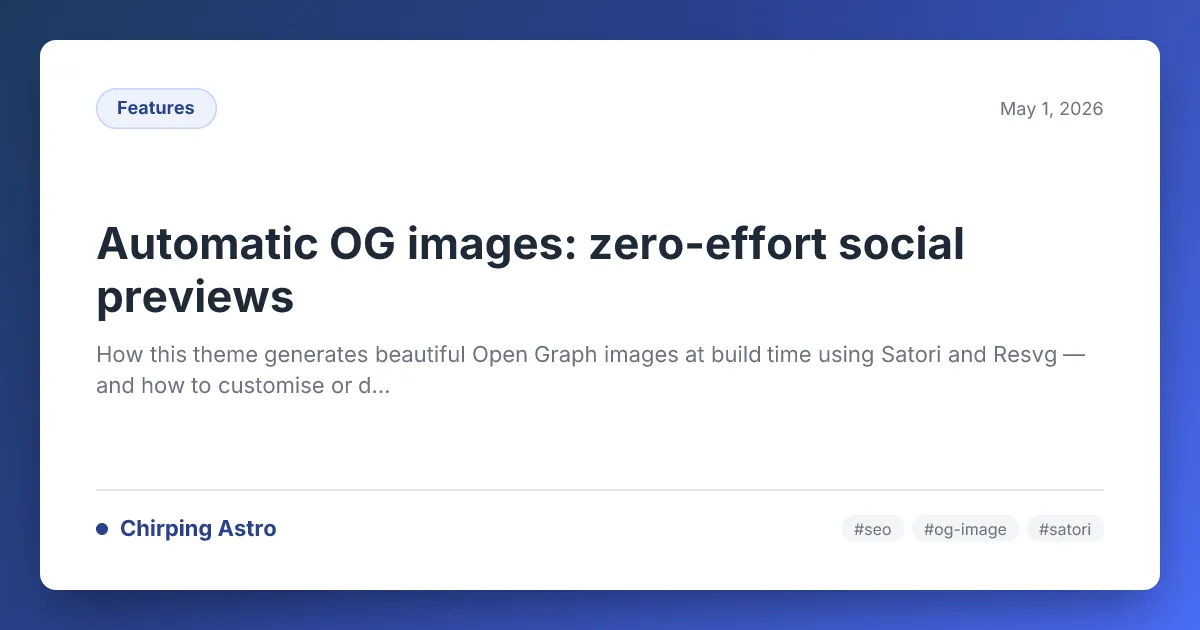
Each OG image features:
- A deep indigo-blue gradient border (matching the theme’s primary colour).
- A white card with rounded corners and a subtle shadow.
- Category badge (top-left) in the theme’s indigo pill style.
- Publication date (top-right).
- Post title in bold, with adaptive font sizing for longer titles.
- Description excerpt below the title (truncated at ~120 chars).
- Site branding (bottom-left) Ethe site name with a brand-coloured dot.
- Tags (bottom-right) Eup to 3 tags as pill badges, or the site hostname if no tags are set.
Here’s the OG image that was automatically generated for this very post:
The feature is controlled by a single flag in src/config.ts:
export const SITE: SiteConfig = { // ... autoOgImage: true, // Set to false to disable};When enabled (default):
- A PNG is generated for every post at build time.
- Posts without
heroImageuse the generated OG image. - Posts with
heroImagecontinue to use their hero.
When disabled:
- No OG images are generated (the
/og/route produces zero pages). - Posts without
heroImagefall back toSITE.defaultOgImage(typically viaSITE.defaultOgImage).
The OG image template lives in src/utils/og-image.ts. It exports a
single function:
export async function generateOgImage(data: OgImageData): Promise<Buffer>;The OgImageData interface:
interface OgImageData { title: string; description?: string; date?: string; category?: string; tags?: string[];}The template uses hardcoded hex colours that match the Chirpy theme:
| Element | Current colour | Where to change |
|---|---|---|
| Gradient background | #1e3a5f ↁE#4a6cf7 | background property |
| Card background | #ffffff | backgroundColor |
| Category badge | #2a408e | Multiple style objects |
| Title text | #1f2937 | Title color |
| Description text | #6b7280 | Description color |
| Brand accent dot | #2a408e | Brand dot style |
If you change your site’s --color-primary in CSS, consider updating
these hardcoded values to match.
The template uses Inter (400 + 700) loaded from
@fontsource/inter. To use a different font:
-
Install the font package:
bun add @fontsource/your-font -
Update the file paths in
src/utils/og-image.ts:const fontsDir = join(process.cwd(), 'node_modules/@fontsource/your-font/files');const fontRegular = readFileSync(join(fontsDir, 'your-font-latin-400-normal.woff'));const fontBold = readFileSync(join(fontsDir, 'your-font-latin-700-normal.woff')); -
Update the font name in the
satori()options:fonts: [{ name: 'YourFont', data: fontRegular, weight: 400, style: 'normal' },{ name: 'YourFont', data: fontBold, weight: 700, style: 'normal' },],
Satori uses a flexbox-only layout engine. Every element must have
display: 'flex' if it has more than one child. The markup is a plain
JavaScript object tree (no JSX needed):
{ type: 'div', props: { style: { display: 'flex', /* ... */ }, children: 'Hello world', },}Satori supports: flexbox (flex-direction, gap, justify-content,
align-items), border-radius, padding, margin, background
(including linear-gradient), box-shadow, font-size,
font-weight, color, line-height, border, and more.
It does not support: CSS Grid, position: absolute/relative,
transform, animations, pseudo-elements, or media queries.
To add a site logo/avatar to the OG image, read it as a base64 data URL:
import { readFileSync } from 'node:fs';import { join } from 'node:path';
const avatar = readFileSync(join(process.cwd(), 'src/assets/images/site/avatar.svg'));const avatarDataUrl = `data:image/svg+xml;base64,${avatar.toString('base64')}`;
Then add an img element in the template:
{ type: 'img', props: { src: avatarDataUrl, width: 48, height: 48, style: { borderRadius: '50%' }, },}If a post has a heroImage in frontmatter, that image is used for the
OG meta tag Ethe auto-generated image is not used:
---title: My post with a custom OGheroImage: ../../assets/images/posts/automatic-og-images/my-custom-og.png---This gives you full control on a per-post basis. Write posts without
heroImage to get the automatic OG, or set one when you want a
bespoke visual.
- Build time: Each image takes ~50 E00ms to generate (depending on your machine). For a site with 100 posts ÁE2 locales, that’s ~10 E0 seconds added to your build.
- File size: Generated PNGs are typically 100 E15 KB Ewell within social platform limits (Twitter recommends < 5 MB, LinkedIn < 8 MB).
- No runtime cost: Images are static files served from your CDN. No serverless functions or edge rendering needed.
- Font loading: Fonts are read from
node_moduleson disk Eno network requests during the build.
| Symptom | Fix |
|---|---|
| OG image not showing on social platforms | Verify the image URL is accessible. Use opengraph.xyz or Twitter’s Card Validator. |
Build fails with Satori error about display: flex | Ensure every div element with multiple children has display: 'flex' in its style. |
| Fonts look wrong or show squares | Confirm the .woff font files exist at the path in og-image.ts. Run bun install if needed. |
| Want to disable for performance | Set autoOgImage: false in src/config.ts. |